Electronics Storage Tips: Secure Appliance & TV Storage Solutions
Whether you’re moving, renovating, or just clearing space, storing electronics in Montreal, the South Shore, or the Laurentians requires extra care. From TVs to kitchen appliances, learn how to protect your devices from dust, moisture, and damage in Quebec’s changing climate.
Storing electronics and appliances can be a real headache, especially if you want to avoid dust, moisture, and those sneaky temperature swings. Packing things up properly and picking the right storage spot will save you a lot of trouble down the road.For instance, you can dodge cracked screens or water-damaged gadgets by using climate-controlled units and following a few tried-and-true tips for packing TVs and small appliances. Montreal Mini-Storage storage solution is a great way to keep things safe, and their partners offer even more peace of mind.
Removing batteries, backing up your data, cleaning off each device, and using original packaging (if you’ve still got it) are all pretty important steps. If you organize your storage space with a little care, you’ll thank yourself later when you need to grab something in a hurry.
If you’re worried about moisture, or just want to know which storage units are best for your appliances, check out this guide to storing electronics in a unit.
Key Takeaways
• Safe storage keeps electronics and appliances in good shape.
• Climate control and packing tricks help you avoid headaches.
• Planning ahead answers storage questions before they become problems.
Electronics and Appliance Storage Best Practices
Protecting electronics and appliances in storage starts with a bit of prep, some good storage habits, and a little care to keep your devices dry. Montreal Mini-Storage storage solution, along with their trusted partners, can make this a lot easier.
Using the right packing methods, choosing the right storage location, and sticking to a maintenance routine will help your stuff last longer.
Preparing Electronics for Storage
Turn everything off and unplug it before it goes anywhere. Wipe down surfaces with a soft, dry cloth to get rid of dust and fingerprints—those can attract moisture and even pests.
Take out cords, cables, and batteries, and pack them separately so you don’t end up with cracked plastics, corrosion, or battery leaks.
If you’ve managed to keep the original packaging, now’s the time to use it—nothing fits better. No box? No problem. Just grab a strong box and plenty of padding like bubble wrap or foam to keep things from shifting and breaking.
Label cords and accessories so you’re not stuck playing “guess the charger” later. Toss in some silica gel packets to soak up any sneaky moisture.
If you want more details on cleaning and packing, check out how to pack electronics for storage.
Safe TV Storage Methods
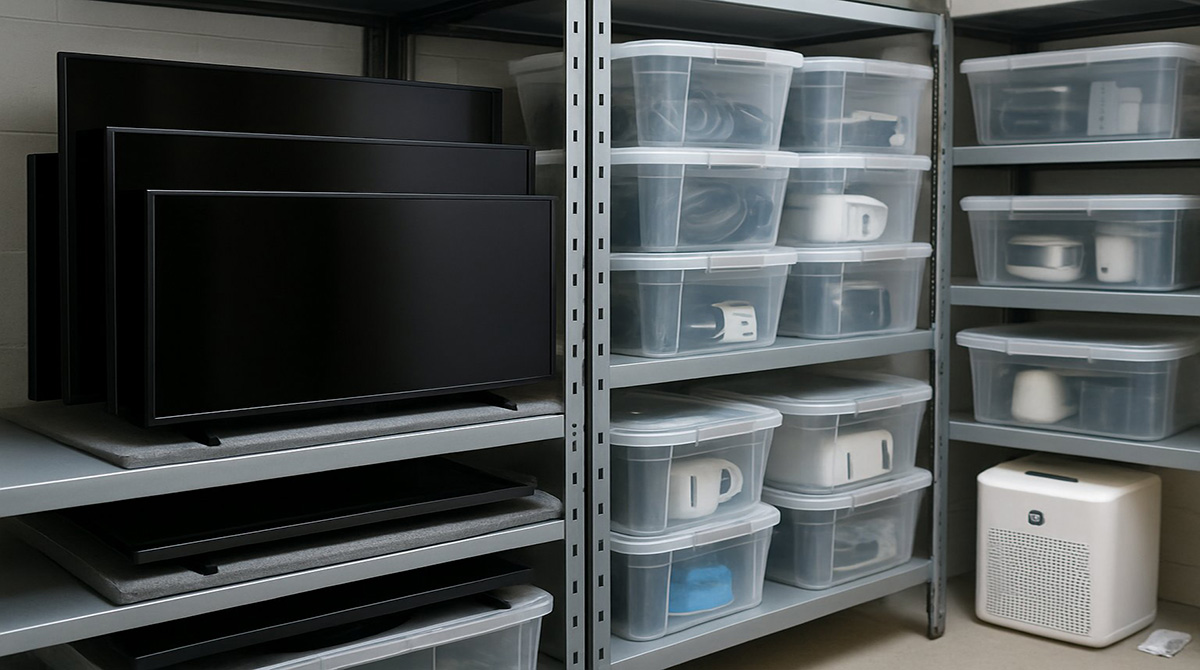
TVs are especially fragile—store them upright, never flat, or you’ll risk a cracked screen. If you still have the original box, use it, and stuff some styrofoam or blankets around the TV for extra cushioning.
No original box? Use a sturdy moving box and pad it well so the TV doesn’t slide around. Don’t let heavy stuff sit on top of your TV, and keep cords and remotes in a labelled bag taped to the TV or tucked inside the box.
Keep TVs off the ground to avoid water damage if there’s ever a leak. Shelves or pallets work great for that. Montreal Mini-Storage storage solution has units with these features, and their partners can help set things up.
Want more on safe storage? Here’s a guide on how to store electronics safely in a storage unit.
Preventing Moisture Damage to Devices
Humidity is a big enemy of electronics. Moisture can corrode circuits and ruin your gear.
Aim for a cool, dry spot with stable temps between 10°C and 27°C. Humidity should be between 30% and 50%—anything higher and you’re asking for condensation inside your devices.
Dehumidifiers or moisture absorbers are your friends, especially if your storage space isn’t climate-controlled. Store electronics in airtight, sealed containers if you can, and always toss in a few silica gel packets.
If you can, check on your stuff now and then—especially after storms or wet weather. Want more advice? Here’s a guide to safe electronics storage.
Choosing Storage Units for Appliances
Big appliances like fridges, washers, and ovens need a little extra planning. Climate-controlled storage units are best—they’ll shield your appliances from wild temperature swings and humidity. Montreal Mini-Storage storage solution offers these units, and their partners can help with moving and setup.
Store appliances upright and don’t stack heavy things on top. Before moving, empty, clean, and dry everything thoroughly.
Leave doors and lids cracked open for airflow so mould doesn’t get a foothold. Pallets underneath add a layer of protection from any water on the floor.
Measure your appliances and check the storage unit’s dimensions before signing anything. If you want more tips, check out best practices for storing electronics and appliances.
Packing and Labelling for Easy Retrieval
Organization is your best friend when it comes to finding stuff later. Use sturdy, stackable boxes and fill any gaps with padding to keep things from rattling around.
Make a quick inventory list, jotting down box numbers and their contents. Slap on big, clear labels. Colour-coded stickers are a lifesaver for telling different types of electronics or appliances apart.
Keep manuals, remotes, and essential accessories in labelled bags inside the same box. Grouping things together now saves you a ton of searching later.
Long-Term Maintenance and Monitoring
If you’re storing electronics and appliances for a long time, give them a check-up every so often. Pop into your Montreal Mini-Storage storage solution unit and look for dust, pests, moisture, or mould.
Wipe off dust with a dry cloth and make sure there’s no sign of leaks or humidity build-up.
Plug in and test your devices once in a while to make sure they still work. Rotate batteries or give things a quick charge if needed.
Keep an eye on the storage conditions—add dehumidifiers or silica gel packets if you notice any dampness.
If you’re using Montreal Mini-Storage storage solution, ask the staff (or their partners) to let you know if they spot any issues. For more electronics-specific tips, check out storage tips for electronics.
Frequently Asked Questions
Storing electronics and appliances safely means paying attention to temperature, moisture, and how you pack things up. Montreal Mini-Storage storage solution and their partners are experts at preventing rust, corrosion, and internal damage.
What are the optimal environmental conditions for storing electronic devices to prevent moisture damage?
Keep electronics in a climate-controlled space, ideally between 10°C and 25°C. Humidity should stay under 50% to avoid condensation and corrosion.
High humidity is trouble for circuits, so using a climate-controlled storage unit—like those at Montreal Mini-Storage storage solution—is definitely worth it.
How can one properly pack and store large appliances to ensure their longevity?
Clean and dry large appliances like fridges, washers, and stoves before putting them in storage. Leave doors slightly open for airflow, and store them upright.
Wrapping with blankets or plastic covers keeps dust and scratches at bay. Montreal Mini-Storage partners can help with moving and prepping these items.
What measures should be taken to safely store televisions when not in use?
Store TVs in their original boxes if you can, using foam inserts for shock absorption. Always keep them upright—don’t stack heavy stuff on top.
Place silica gel packs or other moisture absorbers inside the box to keep condensation away. Montreal Mini-Storage storage solution units are perfect for this.
Are there specific types of storage units best suited for electronic appliances?
A climate-controlled storage unit is best. It keeps temperature and humidity steady, so electronics and appliances stay safe.
Standard units might expose your stuff to heat, cold, or moisture. If you can, go with Montreal Mini-Storage storage solution and their partners—they actively monitor environmental conditions.
What are the best practices for long-term storage of electronic items to avoid damage?
Clean electronics well and pull out the batteries. Pack everything in sturdy boxes with plenty of padding, and fill empty spaces so nothing shifts.
Use silica gel or moisture absorbers in each box. Stack boxes for airflow, and check now and then for dampness or pests. Montreal Mini-Storage storage solution and partners can help you keep everything in top shape.
How can one manage cords and accessories when storing electronics to maintain organization and prevent loss?
First off, label every single cord and accessory before packing anything away with Montreal Mini-Storage. It sounds tedious, but trust me, you’ll thank yourself later.
Grab some clear plastic bags or cable ties—really, anything to keep those wires from turning into a tangled nightmare. Stick the bags right onto the device or its box, if you can. It keeps everything together and is surprisingly satisfying.
Take a minute to jot down a checklist of every item you’re storing and attach it to each package. That way, you’re not left guessing what’s in which box next time you visit your Montreal Mini-Storage unit. If you’re working with Montreal Mini-Storage partners, ask if they have extra tips or supplies—they usually do.
